
凌晨一点半,我的论文实验又因为 Agent Maestro 的 120 秒超时而失败了。
这是第三次了。我需要对多个 LLM 进行跨模型验证实验,每次调用需要处理大量上下文,120 秒根本不够。更要命的是,这个超时是硬编码的,没有任何配置选项。
"行,那我自己写一个。"
于是,GateX 诞生了。
🔍 Agent Maestro 原理分析
在动手之前,我先研究了 Agent Maestro 到底是怎么工作的。这是一个非常聪明的设计——它利用了 VS Code 1.90+ 引入的 vscode.lm API,将 Copilot 的订阅模型暴露为 HTTP 服务。
vscode.lm API:被低估的宝藏
VS Code 的 Language Model API 是一个相对低调但极其强大的接口。核心 API 只有几个:
// 获取所有可用模型
const models = await vscode.lm.selectChatModels({});

// 发送请求
const response = await model.sendRequest(messages, options, token);

// 处理流式响应
for await (const chunk of response.text) {
    console.log(chunk);
}
通过这个 API,扩展可以直接调用用户 Copilot 订阅中的模型——包括 GPT-4o、GPT-4o-mini,甚至最新的 GPT-5.2-Codex。
Agent Maestro 的架构
Agent Maestro 的设计很简单:
外部请求 → HTTP Server → vscode.lm API → Copilot 模型 → 响应
它接收 OpenAI 格式的请求,将其转换为 VS Code 的 LanguageModelChatMessage,发送给模型,然后将响应转换回 OpenAI 格式返回。
致命缺陷:硬编码的 120 秒
问题出在这里:
// Agent Maestro 源码(推测)
const timeoutId = setTimeout(() => cts.cancel(), 120000); // 硬编码 120s
对于简单的对话,120 秒绰绰有余。但对于我的实验场景——需要处理数万 token 的上下文,每个请求可能需要 3-5 分钟——这就是灾难。
更糟糕的是:
- 没有重试机制:超时就是超时,直接失败
- 没有响应缓存:相同的请求每次都要重新调用
- 不支持 Anthropic 格式:只能用 OpenAI 格式
🛠️ GateX 的诞生
既然 Agent Maestro 不能满足需求,那就自己造一个。目标很明确:
| 功能 | Agent Maestro | GateX(目标) |
|---|---|---|
| HTTP API | ✅ | ✅ |
| OpenAI 格式 | ✅ | ✅ |
| Anthropic 格式 | ❌ | ✅ |
| 可配置超时 | ❌ (120s固定) | ✅ |
| 智能重试 | ❌ | ✅ |
| 响应缓存 | ❌ | ✅ |
| SSE 流式 | ❌ | ✅ |
| 请求队列 | ❌ | ✅ |
项目结构
gatex/
├── src/
│   ├── extension.ts   # 扩展入口
│   ├── server.ts      # HTTP 服务器
│   ├── models.ts      # 模型管理
│   ├── queue.ts       # 请求队列
│   ├── cache.ts       # 响应缓存
│   ├── stats.ts       # 统计追踪
│   ├── statusBar.ts   # 状态栏
│   └── dashboard.ts   # 监控面板
└── package.json
🚀 核心实现
1. 双格式 API 支持
GateX 同时支持 OpenAI 和 Anthropic 两种 API 格式:
// server.ts
if (url === '/v1/chat/completions') {
    await this.handleOpenAIChatCompletions(req, res);
} else if (url === '/v1/messages') {
    await this.handleAnthropicMessages(req, res);
}
对于 Anthropic 格式,我做了模型名映射:
private mapAnthropicModelToVSCode(anthropicModel: string): string {
    const mapping: Record<string, string> = {
        'claude-sonnet-4-20250514': 'gpt-4o',
        'claude-3-5-sonnet-20241022': 'gpt-4o',
        'claude-3-opus-20240229': 'gpt-4o',
        'claude-3-haiku-20240307': 'gpt-4o-mini',
    };
    return mapping[anthropicModel] || 'gpt-4o';
}
这样,使用 Anthropic SDK 的代码可以无缝切换到 GateX:
import anthropic

client = anthropic.Anthropic(
    base_url="http://localhost:24680/v1",
    api_key="gatex"  # 任意非空字符串
)

message = client.messages.create(
    model="claude-sonnet-4-20250514",  # 会映射到 gpt-4o
    max_tokens=1024,
    messages=[{"role": "user", "content": "Hello!"}]
)
2. SSE 流式输出
流式输出是现代 LLM API 的标配。GateX 实现了两种格式的 SSE:
// OpenAI 格式
private streamOpenAIChunk(res: http.ServerResponse, content: string, model: string): void {
    const chunk = {
        id: `chatcmpl-${Date.now()}`,
        object: 'chat.completion.chunk',
        created: Math.floor(Date.now() / 1000),
        model: model,
        choices: [{
            index: 0,
            delta: { content: content },
            finish_reason: null
        }]
    };
    res.write(`data: ${JSON.stringify(chunk)}\n\n`);
}

// Anthropic 格式
private streamAnthropicChunk(res: http.ServerResponse, content: string): void {
    const event = {
        type: 'content_block_delta',
        index: 0,
        delta: { type: 'text_delta', text: content }
    };
    res.write(`event: content_block_delta\n`);
    res.write(`data: ${JSON.stringify(event)}\n\n`);
}
3. 智能重试与指数退避
网络抖动和临时故障是常态。GateX 实现了带指数退避的智能重试:
// queue.ts
export class RequestQueue {
    private async executeWithRetry<T>(
        task: () => Promise<T>,
        maxRetries: number
    ): Promise<T> {
        let lastError: Error | null = null;

        for (let attempt = 0; attempt <= maxRetries; attempt++) {
            try {
                return await task();
            } catch (error: any) {
                lastError = error;

                if (!this.isRetryable(error) || attempt === maxRetries) {
                    throw error;
                }

                // 指数退避:1s, 2s, 4s...
                const delay = Math.pow(2, attempt) * 1000;
                await this.sleep(delay);
            }
        }

        throw lastError;
    }

    private isRetryable(error: Error): boolean {
        const message = error.message.toLowerCase();
        return message.includes('timeout') ||
               message.includes('rate limit') ||
               message.includes('temporarily') ||
               message.includes('overloaded');
    }
}
4. LRU 响应缓存
对于确定性请求(temperature=0),缓存可以显著减少重复调用:
// cache.ts
export class ResponseCache {
    private cache: Map<string, CacheEntry> = new Map();
    private readonly maxSize = 50 * 1024 * 1024; // 50MB
    private readonly defaultTTL = 5 * 60 * 1000; // 5分钟

    generateKey(model: string, messages: any[], options?: any): string {
        const data = JSON.stringify({ model, messages, options });
        return crypto.createHash('sha256').update(data).digest('hex');
    }

    get(key: string): string | null {
        const entry = this.cache.get(key);
        if (!entry) return null;

        if (Date.now() > entry.expiresAt) {
            this.cache.delete(key);
            return null;
        }

        // LRU: 移到末尾
        this.cache.delete(key);
        this.cache.set(key, entry);

        return entry.response;
    }
}
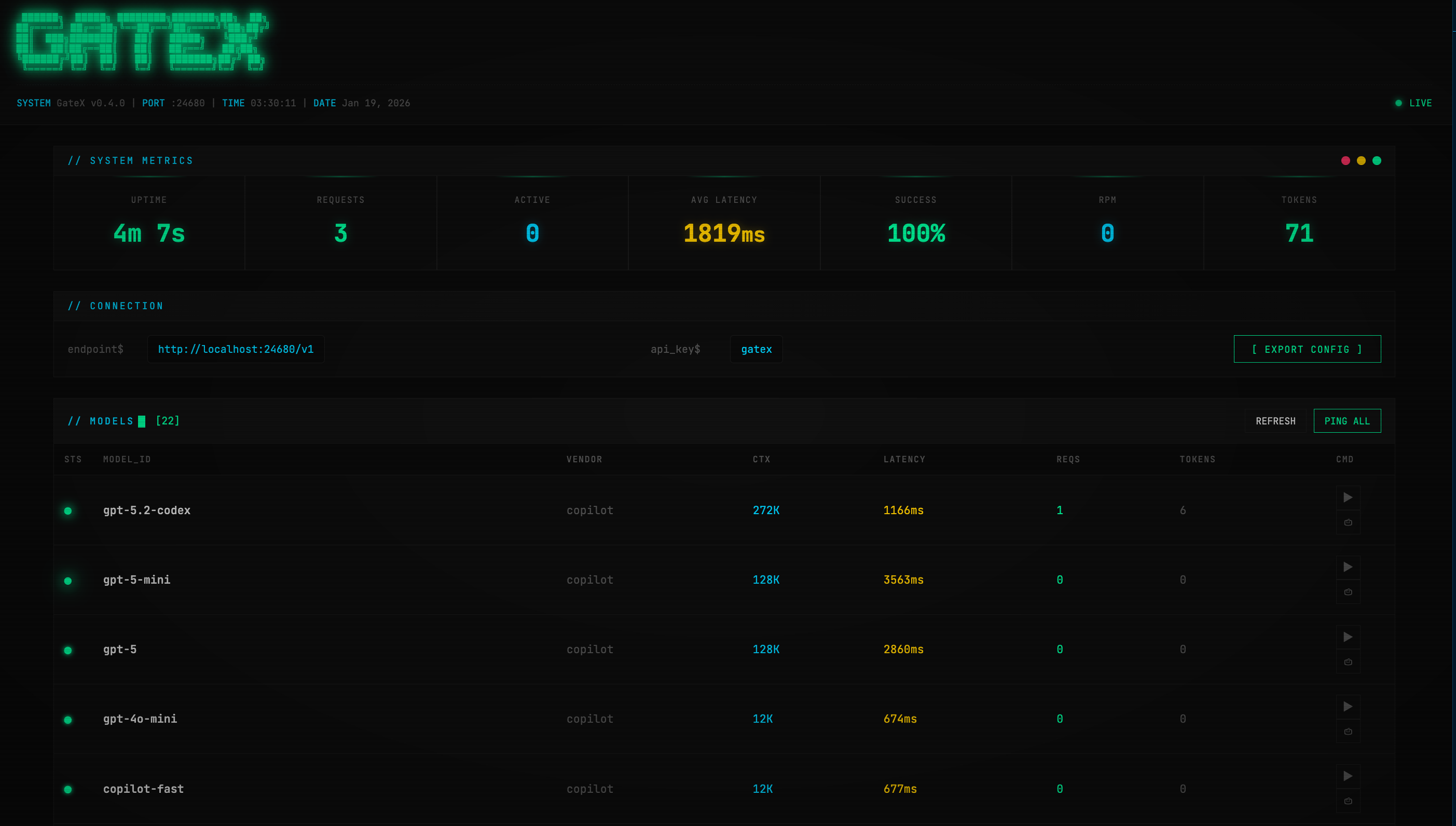
5. Cyberpunk 监控面板
我给 GateX 设计了一个 Matrix 风格的监控面板,使用 JetBrains Mono 字体和霓虹绿配色:
 ██████╗  █████╗ ████████╗███████╗██╗  ██╗
██╔════╝ ██╔══██╗╚══██╔══╝██╔════╝╚██╗██╔╝
██║  ███╗███████║   ██║   █████╗   ╚███╔╝
██║   ██║██╔══██║   ██║   ██╔══╝   ██╔██╗
╚██████╔╝██║  ██║   ██║   ███████╗██╔╝ ██╗
 ╚═════╝ ╚═╝  ╚═╝   ╚═╝   ╚══════╝╚═╝  ╚═╝
面板功能:
- 实时统计:请求数、成功率、RPM、Token 用量
- 模型健康检查:并行 ping 所有模型,30 秒自动刷新
- 配置导出:一键生成 Python/cURL/Node.js 代码
📊 版本演进
整个开发过程大约一天,经历了多个版本迭代:
| 版本 | 主要功能 |
|---|---|
| v0.1.0 | 基础 HTTP 服务器 + OpenAI 格式 |
| v0.2.0 | Dashboard 面板 |
| v0.3.0 | 实时统计 + 自动刷新 |
| v0.4.0 | Cyberpunk 界面重设计 |
| v0.5.0 | 智能重试 + 缓存 + Anthropic 支持 |
| v0.6.0 | 并行健康检查 + 配置导出 |
🎯 使用方法
安装
# 在 gatex 目录下
npm install
npm run compile
npx vsce package
code --install-extension gatex-0.6.0.vsix
配置
在 VS Code 设置中:
{
    "gatex.port": 24680,
    "gatex.timeout": 300,
    "gatex.maxRetries": 3,
    "gatex.cacheEnabled": true
}
调用示例
from openai import OpenAI

client = OpenAI(
    base_url="http://localhost:24680/v1",
    api_key="gatex"
)

response = client.chat.completions.create(
    model="gpt-4o",
    messages=[{"role": "user", "content": "Hello!"}],
    stream=True
)

for chunk in response:
    print(chunk.choices[0].delta.content or "", end="")
💡 经验总结
技术收获
- vscode.lm API 的强大:这个 API 比我想象的更灵活,直接复用 Copilot 订阅是个天才设计
- SSE 的复杂性:OpenAI 和 Anthropic 的 SSE 格式差异比想象中大
- 并发控制的必要性:VS Code 的 LM API 对并发有隐性限制,需要队列管理
设计反思
- 从需求出发:Agent Maestro 的 120s 超时直接触发了 GateX 的诞生
- 渐进式开发:从最小可用版本开始,逐步添加功能
- UI 很重要:Cyberpunk 风格的面板让调试变得愉快
下一步计划
- 添加 WebSocket 支持(替代 SSE)
- 实现模型级别的流量控制
- 支持自定义模型名映射规则
-
发布到 VS Code Marketplace→ 已完成!
🔗 相关链接
当我完成 GateX v0.6.0 的最后一次测试时,已经是第二天凌晨两点了。
但看着那个闪烁的霓虹绿状态指示器,看着 5 个模型全部显示 ● 健康状态,我觉得这一切都值了。
Agent Maestro,再见。
GateX 的代码已在我的 GitHub 仓库开源,欢迎 Star 和 PR。